

I use Apple Reminders because my family does. Groceries, household chores, dogs, babysitting - all shared lists with my partner and nanny. If it were just me, I’d probably use something more developer-oriented. But Reminders is the one thing everyone in the house can use without thinking about it, and iCloud sync means changes show up on every device instantly.
The problem is, I also want to automate it. I’ve been building a personal automation system that ties together Obsidian, AI agents, and Apple Reminders. I needed to create reminders, assign them to sections, set up recurrence rules, and have it all sync to everyone’s phones. From the terminal. Programmatically. And increasingly, through AI agents using MCP servers, Claude Code skills, and OpenClaw.
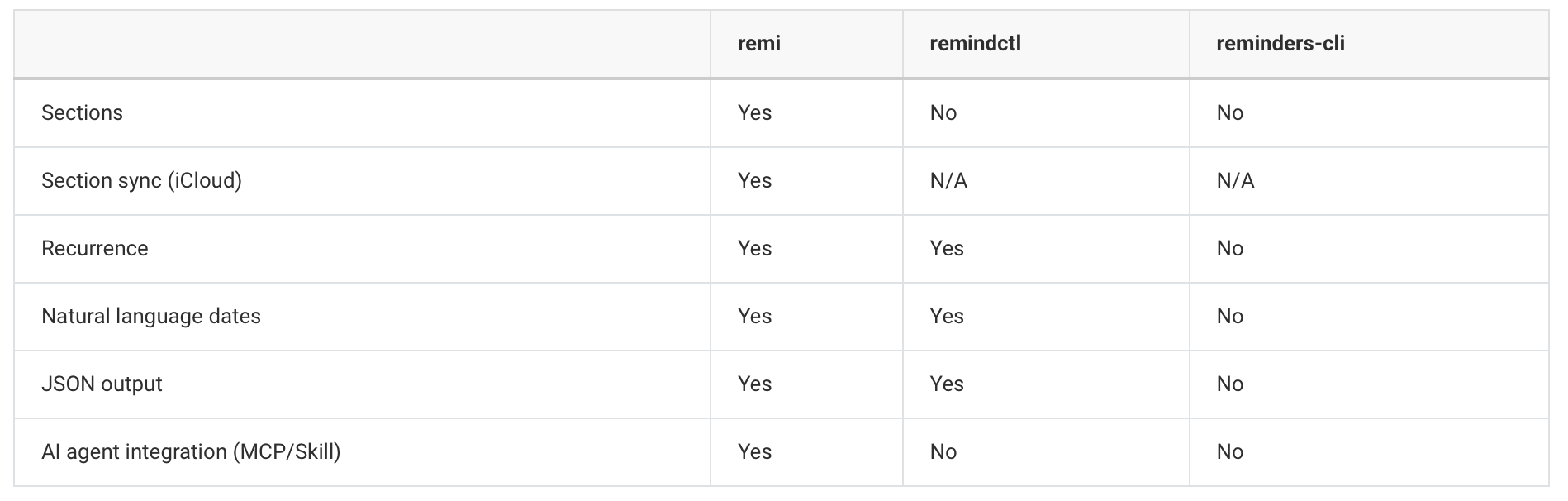
The existing CLI tools (remindctl, reminders-cli) use Apple’s EventKit API. They handle basic operations fine. But they can’t create sections, assign reminders to sections, or reliably sync everything to iCloud. I figured someone had solved this already. Nobody had. So I built remi.
It started with sections, but the problems went deeper
Sections are the organizational feature Apple added to Reminders in macOS 13. You group reminders under headings like “Weekly,” “Monthly,” “Urgent.” It’s how I organize my household routine - 40+ recurring tasks across 11 sections.
EventKit, Apple’s public API, has zero awareness of sections. No property, no method, no query. This is why every existing CLI tool ignores them.
But sections were just where the problems started. I also found:
Recurrence rules don’t persist when added after creation. You have to add them before the first
save()call, or they silently disappear.Date-only reminders get a “00:00” time if you set hour/minute to zero. You have to omit time fields entirely.
Subtask relationships aren’t exposed through EventKit. The
ZPARENTREMINDERcolumn exists in SQLite but Apple never surfaced it publicly.iCloud sync just doesn’t happen unless you understand how Apple’s sync daemon decides what to push.
Each of these individually is annoying. Together, they mean no existing tool can reliably manage Apple Reminders with the full feature set people actually use.
Three layers deep into Apple’s stack
Building remi required going through three separate systems, each more undocumented than the last:
Layer 1: EventKit handles the basics. Creating reminders, setting due dates, recurrence rules, marking things complete. This is the safe, supported layer. All the other CLI tools stop here.
Layer 2: ReminderKit is Apple’s private framework at /System/Library/PrivateFrameworks/ReminderKit.framework. It exposes section CRUD through Core Data. Since it goes through Core Data properly, section changes sync to iCloud automatically. You access it at runtime via NSClassFromString. It could break with any macOS update. But it’s the only way to create sections that actually sync.
Layer 3: SQLite + CRDT token maps is where things got genuinely interesting. Section membership (assigning a reminder to a section) isn’t exposed by EventKit OR ReminderKit. The only way to do it is to write directly to Apple’s Reminders SQLite database. And getting those writes to sync to iCloud required reverse-engineering Apple’s sync daemon.
How remindd actually works
Apple’s remindd daemon manages iCloud sync for Reminders. I expected it to use NSPersistentCloudKitContainer, Apple’s standard Core Data + CloudKit integration. It doesn’t.
remindd runs a custom CloudKit sync engine with CRDT-style vector clocks for field-level conflict resolution. Each syncable field on a list record has an entry in a “resolution token map” stored in the database:
 {
   “map”: {
     “membershipsOfRemindersInSectionsChecksum”: {
       “counter”: 5,
       “modificationTime”: 796647639.739,
       “replicaID”: “C8116DE3-F9C5-4C94-B3FF-1A10D5184298”
     }
   }
 }
When remindd prepares a CloudKit push, it compares each field’s counter against the last-synced state. Fields with incremented counters get included. Fields without changes get skipped.
Simply writing to the SQLite database does nothing for sync. The counter doesn’t change, so remindd doesn’t know anything changed. Your data sits there locally, forever.
Three bugs that took days each to find
Bug 1: Token map entries need to be nested inside a “map” key with a replicaID. I initially wrote the membership counter at the top level of the JSON. remindd ignored it completely. Apple nests all token map entries inside a "map" key, and each entry needs a UUID called replicaID. Neither of these is documented anywhere. I found it by comparing my database entries against a list where sections were syncing correctly via the Reminders UI.
Bug 2: The SQLite connection must be closed before triggering sync. After writing membership data, I trigger a sync cycle by making a trivial EventKit edit. But if the database connection is still open, the WAL (Write-Ahead Log) hasn’t been checkpointed, and remindd reads stale data. My changes were being written correctly but remindd was reading the pre-change state. Adding a sqlite3_close() followed by a 500ms delay before the sync trigger fixed it.
Bug 3: Editing a reminder doesn’t trigger a list-level push. This was the hardest. The standard technique for triggering sync is to toggle a trailing space on a reminder’s notes field. This triggers remindd to push the reminder record. But membership data lives on the list record, not the reminder record. remindd wasn’t checking the list’s token map when only a reminder changed.
The fix: create and immediately delete a temporary reminder. This forces remindd to update reminderIDsMergeableOrdering on the list record, which triggers a full list-level CloudKit push that includes the membership data.
Each of these took 1-2 days to diagnose. The symptoms were always the same: everything looked correct locally, but changes never appeared on other devices. No error messages. No crash. Just silence.
The result
remi wraps all of this behind a simple CLI:
 remi create-section “Groceries” “Produce”
 remi add “Groceries” “Bananas” --section “Produce”
 remi move “Groceries” “Bananas” --to-section “Dairy”
 remi today
 remi overdue
Underneath: EventKit, ReminderKit, SQLite, SHA-512 checksums, CRDT vector clocks, WAL checkpointing, and temporary reminder sync triggers. All syncing to every Apple device via iCloud.
It also supports natural language dates (--due "next tuesday"), recurrence rules (--repeat "every 2 weeks"), fuzzy name matching (remi list shopping finds “Groceries / Shopping List”), JSON output for automation, and an MCP server for AI agent integration (remi --mcp).
Why I’m sharing this
I built remi because I needed it for my family’s shared reminders. But I think other people will want this too.
If you’re using AI agents (Claude, OpenClaw, or any MCP-compatible tool) and want them to manage your reminders properly, including sections, there hasn’t been a way to do that. remi ships as an MCP server, a Claude Code plugin, a skills.sh skill, and an OpenClaw skill. Install it once and your agents can manage your reminders.
If you’re a developer who lives in the terminal and wants a proper Reminders CLI, the existing tools are good at what they do but they stop at EventKit’s boundaries. remi goes further.
And if you’re building your own tools that interact with Apple Reminders, the internals document will save you days. The token map structure, the sync trigger mechanism, the ReminderKit bridge pattern - none of this is documented by Apple.
remi is on GitHub. Install with brew tap mattheworiordan/tap && brew install remi. I’d love feedback.
remi is available via Homebrew, npm, Claude Code plugin, skills.sh, OpenClaw, and the MCP Registry.